
Run AI on your documents without the cloud: how we built a self-hosted pipeline
Private AI on your own contracts and files. Every step runs on hardware you own, nothing leaves the building, and there is no monthly API bill waiting at the end of it.
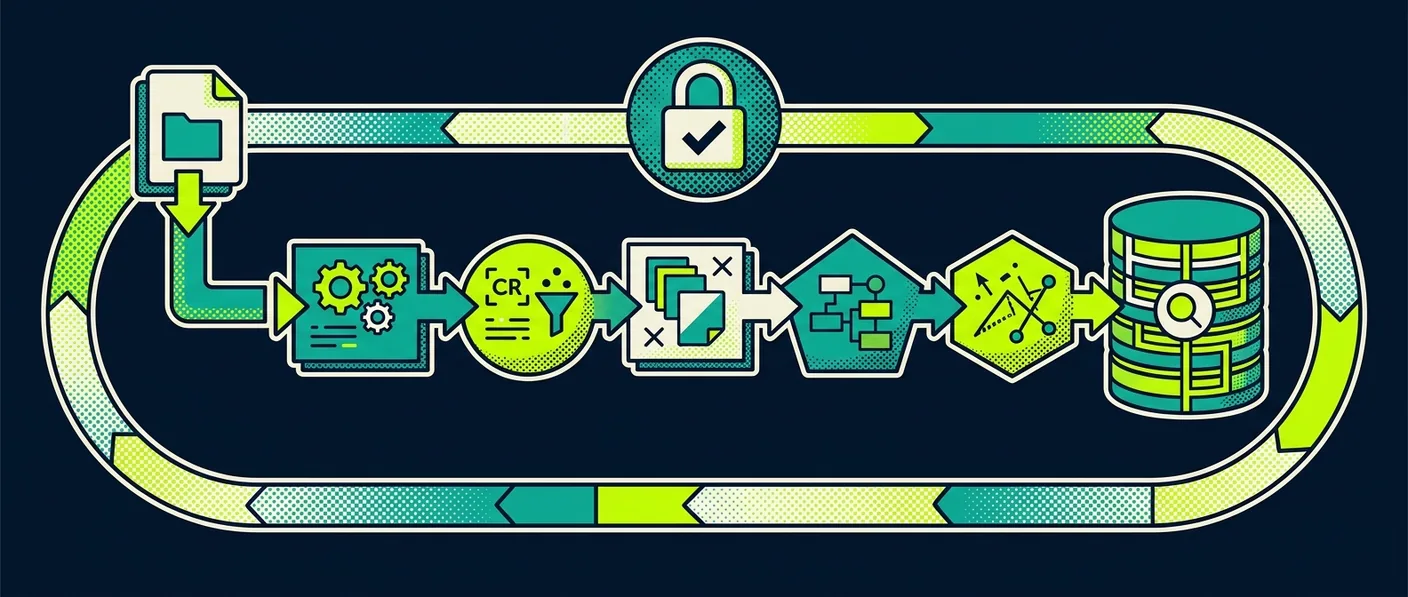
A PDF lands in a watched folder. About a minute later it is summarised, embedded, archived, and ready to answer questions in plain language. No file ever leaves the building, and there is no API bill at the end of the month. Here is exactly how it works, what it cost, and why data control is the part that actually matters.
01What is a self-hosted AI document pipeline?
A self-hosted AI document pipeline is a full retrieval-augmented system where every step, from reading a file to answering a question about it, runs on hardware you own and control. Nothing is sent to a cloud API at any point. We built one and we run it on a NAS in our office. Drop a PDF into a watched folder, and roughly a minute later it is summarised, embedded, archived, and queryable in plain language.
Most conversations about AI in professional services start with the wrong question. Which model is smartest. Which vendor has the biggest context window. That framing quietly assumes your documents will sit on someone else’s servers, and for a law firm, a tax advisor, or a consultancy handling client contracts, that assumption is the whole risk.
The question we cared about was simpler. Who controls the data. So we answered it with a working system instead of a slide.
02What does the pipeline do, end to end?
The pipeline turns a dropped PDF into a sourced, chat-ready answer without a human touching any step. A Python watchdog, using inotify, fires the moment a file lands. pypdf pulls the full text as UTF-8 across every page. A test contract came out at 1,847 characters. A local model summarises it, we generate an embedding, we archive the original with a content hash, and we push the whole thing into a knowledge base you can chat with. The run we timed took about 62 seconds start to finish.
Speed is not the point. The point is that the document arrives and the knowledge base updates itself, with no one in the loop.
03Why does each tool earn its place?
Each tool in the pipeline earns its place by doing one job well on modest hardware. The summary runs on Ollama with qwen2.5, on-device, producing a tight five-bullet legal summary. On the NAS, an Intel N100 rather than a GPU rig, it holds around 12 tokens per second. Slow next to a datacentre, fast enough for a document that arrived while you were making coffee. It costs nothing and phones nobody.
Embedding is where the domain choice pays off. We run a Text Embeddings Inference server with a legal-tuned xlm-roberta model, 768 dimensions, multilingual across English, German, French, Italian and Spanish. It understands contracts, NDAs and obligations rather than matching keywords. That is the difference between a search box and something that retrieves the right clause. On the N100, an embedding lands in roughly 1.2 seconds.
Archiving goes through Papra’s REST API with SHA-256 deduplication. Drop the same file twice and the second one is recognised, not stored again. Every document gets a stable ID and a hash, so the archive stays clean on its own.
The final step ingests everything into an OpenWebUI knowledge base, queryable in plain language. Ask what the payment terms are in a given agreement and you get the answer with the source document named, in seconds. The Acme service agreement we tested with is sample data, not a real client file. This is the same assemble-open-tools discipline behind our GSC-MCP AI audit workflow.
04What did it cost, and what did it not?
The pipeline cost two evenings to build and €0 per month to run. There is no external call to be private about, so it is one hundred percent private by design. The hardware is a UGREEN DXP NAS with an Intel N100, everything in Docker, stood up in February 2026.
Set that against the reflex of wiring the same workflow to a cloud LLM. The cloud version is faster per token and needs no local setup. It also means your clients’ contracts leave your control, you carry a monthly bill that scales with usage, and your data-processing story now includes a third party you have to vet, document, and trust. For a lot of professional-services work that trade is not worth it. Until we built this, we assumed the private version would be far more painful than it turned out to be.
- 01Client documents stay inside your own four walls. No file leaves the building.
- 02No recurring API bill that scales with usage. €0 per month, not a metered line item.
- 03No third party in your data-processing story to vet, document, and trust.
05Why does this matter for professional services?
For professional services, a self-hosted AI pipeline matters because it keeps every client document inside your own walls while still giving you the thing everyone actually wants from AI. Drop a document in, ask a question, get a sourced answer. The recurring API cost is gone from the equation entirely.
The future of AI in professional services is not just which model. It is who controls the data.
None of the pieces here are exotic. inotify, pypdf, Ollama, a TEI embedding server, Papra, OpenWebUI: all open, all self-hostable. The work was in assembling them into something that runs untouched. That assembly is exactly the kind of thing we build for firms that want the capability without handing over the data.
If you handle sensitive client documents and want AI on top of them without sending them to anyone’s cloud, let’s talk for 30 minutes. We will walk you through what a private, self-hosted document pipeline would look like on your own infrastructure.